Low-Level Design series #2
Design a basic Music System
Low-level design of a basic music streaming/playback system.
On this page
- Problem Statement
- Core Classes in the Design
- 1. Artist Class
- Responsibility
- Design Insight
- 2. Song Class
- 3. Playlist Class
- Features
- Important LLD Concept: Aggregation
- 4. User Class
- Responsibilities
- Relationship Between User and Playlist
- 5. Library Class
- Why Do We Need a Library?
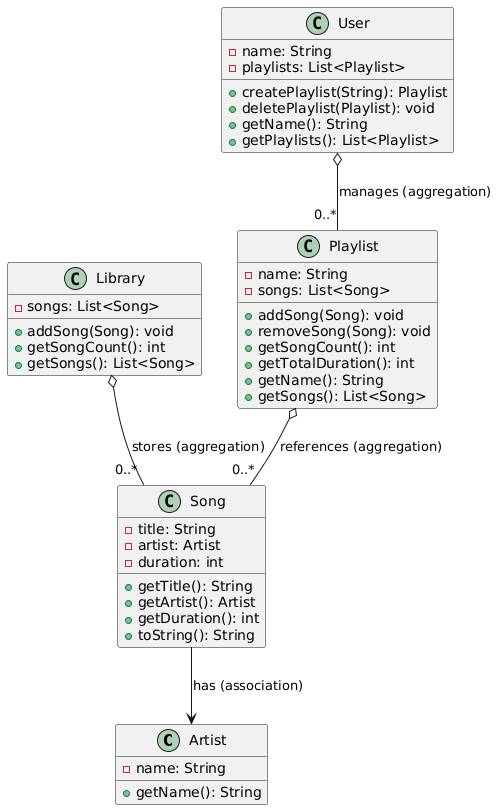
- UML Diagram
- Key LLD Concepts Used
- 1. Encapsulation
- 2. Association
- 3. Aggregation
- 4. Single Responsibility Principle
- 5. Reusability
- Time Complexity Analysis
- Full code
Modern music streaming applications such as Spotify, Apple Music, or YouTube Music rely heavily on well-structured object-oriented design.
In this article, we will design a simplified Music Playlist System using Java and understand the important Low-Level Design (LLD) concepts behind it.
The system supports:
- Artists and songs
- A centralized music library
- Users creating playlists
- Adding/removing songs from playlists
- Shared songs across multiple playlists
- Independent lifecycle management of objects
Problem Statement
We want to design a music system where:
- Songs belong to artists.
- All songs are stored in a master library.
- Users can create multiple playlists.
- A single song can exist in multiple playlists.
- Deleting a playlist should not delete the songs themselves.
This mirrors how real-world music applications work.
Core Classes in the Design
Our design consists of five primary classes:
- Artist - Represents a music artist
- Song - Represents a song
- Playlist - Stores a collection of songs
- User - Manages playlists
- Library - Stores all available songs
1. Artist Class
The Artist class is one of the simplest entities in the system.
class Artist {
    private String name;

    public Artist(String name) {
        this.name = name;
    }

    public String getName() {
        return name;
    }
}
Responsibility
- Stores artist-related information
- Acts as a dependency for songs
Design Insight
This class follows the Single Responsibility Principle (SRP) because it only manages artist data.
2. Song Class
The Song class represents the core entity of the system.
class Song {
    private String title;
    private Artist artist;
    private int duration;
}
Each song contains:
- Song title
- Artist object
- Duration in seconds
Why Association? - A Song refers to an Artist.
This represents a Has-A relationship.
Song HAS-A Artist
This is association in object-oriented design.
3. Playlist Class
The playlist manages a collection of songs.
class Playlist {
    private String name;
    private List<Song> songs = new ArrayList<>();
}
Features
- Add songs
- Remove songs
- Count songs
- Calculate total duration
public void addSong(Song song) {
    songs.add(song);
}
Important LLD Concept: Aggregation
This class demonstrates Aggregation.
A playlist does not own songs permanently. Songs can exist independently outside the playlist.
Playlist HAS-A collection of Songs
If a playlist gets deleted:
- Songs still exist
- Songs may still belong to other playlists
- Songs remain in the library
This is a textbook example of aggregation.
4. User Class
A user can create and manage playlists.
class User {
    private String name;
    private List<Playlist> playlists = new ArrayList<>();
}
Responsibilities
- Create playlists
- Delete playlists
- Store user playlists
public Playlist createPlaylist(String playlistName) {
    Playlist playlist = new Playlist(playlistName);
    playlists.add(playlist);
    return playlist;
}
Relationship Between User and Playlist
A user manages playlists, but the playlists remain independent entities. This keeps the design flexible and scalable.
5. Library Class
The Library serves as the central repository for songs.
class Library {
    private List<Song> songs = new ArrayList<>();
}
Why Do We Need a Library?
Without a centralized library:
- Songs would be duplicated across playlists
- Memory usage would increase
- Song management becomes difficult
Instead, playlists simply reference existing songs. This is memory-efficient and mirrors real-world systems.
UML Diagram
Key LLD Concepts Used
1. Encapsulation
All fields are private.
private String title;
Access is controlled via getters and methods. This protects internal state.
2. Association
A song is associated with an artist.
3. Aggregation
Playlist -> Songs
Playlists use songs but do not own their lifecycle.
4. Single Responsibility Principle
Each class has exactly one job.
- Artist - Artist details
- Song - Song details
- Playlist - Playlist operations
- User - User operations
- Library - Song storage
5. Reusability
The same song object can be reused across multiple playlists.
workout.addSong(hello);
chill.addSong(hello);
Time Complexity Analysis
- Add song to playlist -
O(1) - Remove song -
O(n) - Calculate total duration -
O(n) - Create playlist -
O(1)
Full code
import java.util.ArrayList;
import java.util.List;

class Artist {
    private final String name;

    public Artist(String name) {
        this.name = name;
    }

    public String getName() {
        return name;
    }
}

class Song {
    private final String title;
    private final Artist artist;
    private final int duration;

    public Song(String title, Artist artist, int duration) {
        this.title = title;
        this.artist = artist;
        this.duration = duration;
    }

    public String getTitle() {
        return title;
    }

    public Artist getArtist() {
        return artist;
    }

    public int getDuration() {
        return duration;
    }

    @Override
    public String toString() {
        return title + " - " + artist.getName()
                + " [" + duration + " sec]";
    }
}

class Playlist {
    private final String name;
    private final List<Song> songs;

    public Playlist(String name) {
        this.name = name;
        this.songs = new ArrayList<>();
    }

    public void addSong(Song song) {
        songs.add(song);
    }

    public void removeSong(Song song) {
        songs.remove(song);
    }

    public int getSongCount() {
        return songs.size();
    }

    public int getTotalDuration() {
        int duration = 0;

        for (Song song : songs) {
            duration += song.getDuration();
        }

        return duration;
    }

    public String getName() {
        return name;
    }

    public List<Song> getSongs() {
        return songs;
    }
}

class User {
    private final String name;
    private final List<Playlist> playlists;

    public User(String name) {
        this.name = name;
        this.playlists = new ArrayList<>();
    }

    public Playlist createPlaylist(String playlistName) {
        Playlist playlist = new Playlist(playlistName);
        playlists.add(playlist);

        return playlist;
    }

    public void deletePlaylist(Playlist playlist) {
        playlists.remove(playlist);
    }

    public String getName() {
        return name;
    }

    public List<Playlist> getPlaylists() {
        return playlists;
    }
}

class Library {
    private final List<Song> songs;

    public Library() {
        songs = new ArrayList<>();
    }

    public void addSong(Song song) {
        songs.add(song);
    }

    public int getSongCount() {
        return songs.size();
    }

    public List<Song> getSongs() {
        return songs;
    }
}

public class Main {

    public static void main(String[] args) {

        Artist coldplay = new Artist("Coldplay");
        Artist adele = new Artist("Adele");

        Song yellow = new Song("Yellow", coldplay, 269);
        Song clocks = new Song("Clocks", coldplay, 307);
        Song hello = new Song("Hello", adele, 295);
        Song someoneLikeYou = new Song("Someone Like You", adele, 285);

        Library library = new Library();

        library.addSong(yellow);
        library.addSong(clocks);
        library.addSong(hello);
        library.addSong(someoneLikeYou);

        User alice = new User("Alice");

        Playlist workout = alice.createPlaylist("Workout Mix");
        Playlist chill = alice.createPlaylist("Chill Vibes");

        workout.addSong(yellow);
        workout.addSong(clocks);
        workout.addSong(hello);

        chill.addSong(hello);
        chill.addSong(someoneLikeYou);

        System.out.println("Songs present in library : "
                + library.getSongCount());

        System.out.println();

        System.out.println(
                workout.getName()
                        + " -> "
                        + workout.getSongCount()
                        + " songs, Duration : "
                        + workout.getTotalDuration() + "s"
        );

        for (Song song : workout.getSongs()) {
            System.out.println(" * " + song);
        }

        System.out.println();

        System.out.println(
                chill.getName()
                        + " -> "
                        + chill.getSongCount()
                        + " songs, Duration : "
                        + chill.getTotalDuration() + "s"
        );

        for (Song song : chill.getSongs()) {
            System.out.println(" * " + song);
        }

        System.out.println();

        alice.deletePlaylist(workout);

        System.out.println("After removing playlist : "
                + workout.getName());

        System.out.println("Library song count remains : "
                + library.getSongCount());

        System.out.println("Playlist '"
                + chill.getName()
                + "' still contains "
                + chill.getSongCount()
                + " songs");

        System.out.println("'"
                + yellow.getTitle()
                + "' still exists independently.");
    }
}
That's all, folks...Cheers!!